
Key Takeaways
- The Driver Qualification File (DQF) is a federal requirement under 49 CFR Part 391 — every CMV driver, including owner-operators, must have a complete, current file.
- Manual spreadsheets and paper folders fail at scale because a single missed medical card or CDL expiration can place an unqualified driver behind the wheel.
- Continuous driver monitoring replaces once-a-year checks by flagging expirations, suspensions, and new violations in real time instead of up to 12 months later.
- DQF recordkeeping violations carry steep civil penalties and create out-of-service, insurance, and litigation exposure that often begins months before an audit.
- PTI4YOU keeps the operational side of your audit flawless by centralizing inspection records, maintenance documentation, and compliance workflows alongside your driver files.
Why Driver Qualification File Compliance Matters More in 2026
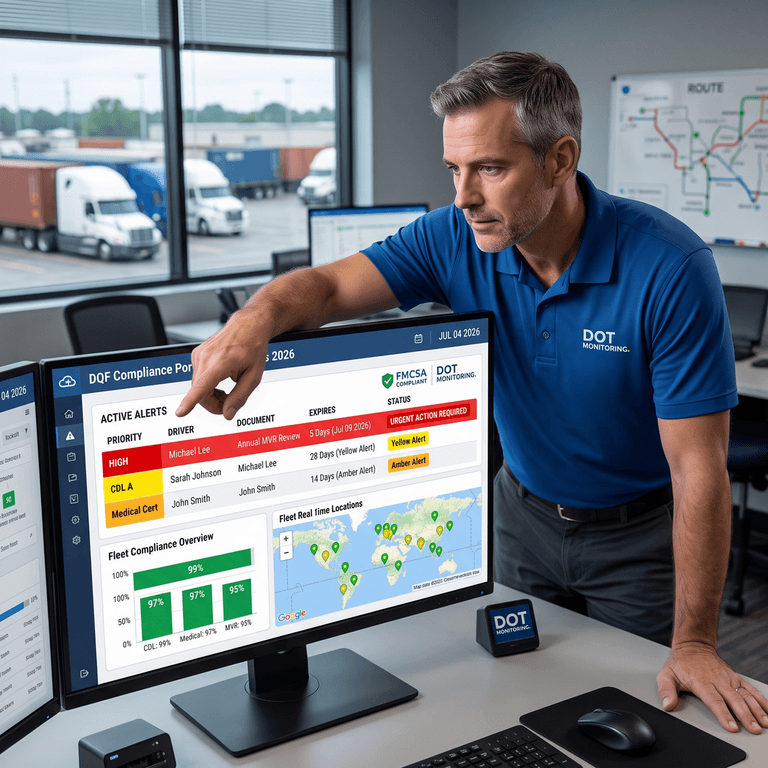
If you operate commercial vehicles in the United States or Canada, the fastest way to survive a DQF audit is to stop managing driver qualification files in spreadsheets and paper folders and move to continuous driver monitoring. Automated driver file compliance software tracks every CDL, medical certificate, and annual motor vehicle record review, alerts you before documents expire, and keeps your FMCSA driver qualification records audit-ready every single day — not just the week an investigator shows up.
In 2026, the margin for administrative error has effectively disappeared. The Federal Motor Carrier Safety Administration (FMCSA) continues to tighten enforcement, plaintiff attorneys actively hunt for compliance gaps to support large negligence verdicts, and insurers increasingly price premiums around documented safety management. For fleet owners, safety managers, and HR managers, that means DOT driver qualification file requirements can no longer live in a dusty filing cabinet or a single fragile spreadsheet.
The core problem is simple but expensive: manual processes depend on human memory. A safety manager has to remember to pull an MVR every 12 months, notice a medical card is about to expire, and chase a driver for a renewed document — all while running daily operations. One missed date, and a driver who is technically unqualified keeps hauling freight. That is not a paperwork inconvenience. It is a direct compliance, financial, and liability exposure.
This guide is written for decision makers who are actively comparing DOT compliance software and audit-readiness solutions. It explains exactly what a DQF must contain, why manual DQ file management breaks down, how continuous monitoring works, and how to build a process that keeps your fleet compliant and confident — whether you run 5 trucks or 500.
What Is a Driver Qualification File (DQF)?
A Driver Qualification File is the mandatory set of documents a motor carrier must keep for every commercial motor vehicle (CMV) driver it employs. Required under FMCSA regulation 49 CFR Part 391, the DQF exists to prove one thing: that a driver is legally, medically, and professionally qualified to operate a commercial vehicle safely. If you cannot document it, the FMCSA treats it as if it never happened.
Every commercial driver needs a DQF — and that includes owner-operators, who must maintain a qualification file on themselves. It is useful to separate the file into two phases. Onboarding compliance covers the documents collected when a driver is hired, such as the employment application and safety performance history. Ongoing compliance covers the records that must be renewed and monitored throughout employment, such as the annual MVR review and the medical examiner's certificate. Most audit failures happen in that second phase, because onboarding gets attention while ongoing renewals quietly slip.
Essential DOT Driver Qualification File Requirements
The table below summarizes the core documents most carriers must retain. Always confirm the current text of the regulation, because retention periods and equivalency rules have specific conditions.
| Document | Requirement / Frequency | Compliance Focus |
|---|---|---|
| Driver's Application for Employment | At hire; retained for the duration of employment plus 3 years | Must capture the required employment history and driver disclosures. |
| Safety Performance History (previous employers) | Investigated within 30 days of hire | Verifies prior accident history and DOT drug/alcohol testing record. |
| Initial Motor Vehicle Record (MVR) | Obtained at hire from each state of licensure | Establishes the driving record baseline for the qualification decision. |
| Annual MVR Review & Certificate of Violations | Every 12 months | Confirms the driver still meets minimum requirements with no disqualifying offenses. |
| Road Test Certificate or Equivalent (CDL copy) | At hire | Documents demonstrated ability to safely operate the assigned vehicle class. |
| Medical Examiner's Certificate | Typically every 1–2 years based on health status | Must come from a certified examiner on the National Registry. |
Searchers looking for FMCSA driver qualification records guidance are rarely confused about what belongs in the file. They struggle with the operational reality of keeping dozens of those documents current across a growing roster. That is exactly where automation pays for itself.
Why Manual DQF Management Is Failing Modern Fleets
For decades, fleet administrators tracked driver files with manila folders, sticky notes, and ever-growing spreadsheets. In 2026, manual DQ file management is failing fleets for predictable, repeatable reasons.
- Spreadsheet tracking is fragile. A spreadsheet only works if every date is entered perfectly and updated forever. Mistype one CDL expiration by a single digit and the safety net silently disappears. Spreadsheets also cannot confirm whether the renewed document was actually received and filed.
- Calendar reminders have no proof of completion. An Outlook reminder might tell you a medical card is due, but it does not verify that the driver visited a certified examiner, uploaded the new certificate, and that the file is now complete.
- Paper folders are a liability. Physical files are lost, coffee-stained, misfiled, and vulnerable to unauthorized access. Retrieving them during a surprise DOT visit creates panic and slows operations to a crawl.
- Human error compounds with staff turnover. When the one administrator who understood your filing system leaves, your institutional compliance knowledge walks out the door with them.
- Audit panic becomes routine. Manual tracking leads to the infamous "audit scramble" — burning days of labor chasing signatures and rebuilding files the night before an investigator arrives.
A realistic fleet scenario
Consider a 28-truck regional carrier. The safety manager tracks medical cards in a spreadsheet. In March, a driver's medical certificate expires, but the reminder was buried under a busy dispatch week. The driver keeps running for three weeks. In April, a roadside inspection flags the expired card, places the driver out of service, and records a violation against the carrier's safety profile. Now the company faces a citation, a lost load, a frustrated customer, and a data point that any future plaintiff attorney can use. None of that required bad intent — only a missed date in a manual system.
The Hidden Cost of Missing Driver Records
The financial damage from weak driver records management reaches far beyond the headline fine. Compliance failures usually begin months before an auditor ever appears, quietly accumulating risk.
Out-of-service orders stop revenue. If a driver operates with an expired medical certificate or suspended CDL, the DOT treats that driver as unqualified. A roadside inspection or terminal investigation can immediately place the driver and vehicle out of service — freight stops moving, deadlines are missed, and your safety rating suffers.
Daily civil penalties add up fast. FMCSA driver qualification and recordkeeping violations carry significant civil penalties, and they can be assessed per violation. Using a driver who is not qualified is treated far more seriously than a minor paperwork lapse, and penalties can climb into the thousands of dollars depending on the infraction and history.
Insurance and litigation exposure multiply. If an unqualified driver is involved in a crash, plaintiff attorneys will subpoena the DQF immediately. A missing background check or an expired medical card becomes documented evidence of negligent qualification — the kind of gap that drives "nuclear verdicts" and can make a fleet difficult to insure at a reasonable rate.
The throughline is that every one of these costs traces back to a record that was missing, expired, or impossible to find quickly. That is a solvable problem.
Tired of Chasing Missing Paperwork?
See how digital document workflows eliminate manual errors, surface expiring records early, and keep your fleet ready for a DOT audit at any moment.
Explore Audit-Ready SolutionsSoft start: ask for a compliance workflow review. No hardware required.
Continuous Driver Qualification Monitoring
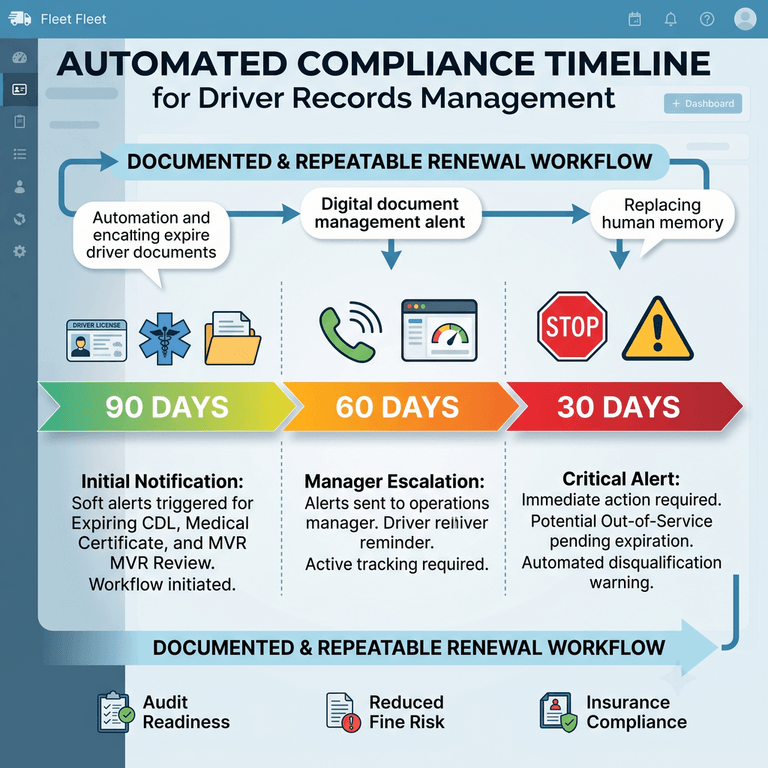
The industry standard has shifted from annual, point-in-time checks to continuous driver monitoring. Instead of waiting 12 months to pull an MVR — and only then discovering a license was suspended six months ago — continuous monitoring keeps an ongoing watch on driver status and document validity.
A continuous compliance system works quietly in the background and manages the parts of the process most likely to be forgotten:
- Automated expiration tracking. The system records the expiration date of every uploaded document and counts down automatically, with no manual spreadsheet to maintain.
- Medical certificate monitoring. Each driver medical certificate is tracked to its expiration so no driver operates on a lapsed card.
- CDL expiration tracking. Built-in CDL monitoring flags upcoming license renewals well before the deadline.
- Annual MVR reminders. Workflows trigger the annual motor vehicle record review on schedule, keeping the 12-month cycle intact.
- Required document notifications. Escalating compliance alerts reach managers and drivers at 90, 60, and 30 days, then daily as a deadline closes.
- Centralized digital records. Every document lives in secure, cloud-based electronic driver files that are searchable from anywhere.
- Compliance dashboards. A single dashboard shows which files are complete, which are expiring, and which need action right now.
The workflow from hiring through ongoing employment
Continuous monitoring follows the driver through their full lifecycle. At hiring, the system enforces a complete onboarding checklist before the driver can be dispatched. During employment, it watches every expiration date, schedules each annual MVR review, and routes renewal tasks automatically. At separation, it archives the file for the required retention period so historical records remain defensible. The result is compliance automation that does not depend on anyone remembering anything.
Manual Tracking vs Automated Compliance
Moving from paper to integrated driver file compliance software produces an immediate, measurable improvement in accuracy, speed, and audit readiness.
| Capability | Manual DQF Management | Continuous Digital Monitoring |
|---|---|---|
| Administrative effort | High; constant manual data entry and follow-up | Low; automated tracking and reminders |
| Accuracy | Vulnerable to typos and forgotten updates | Validated against uploaded documents and dates |
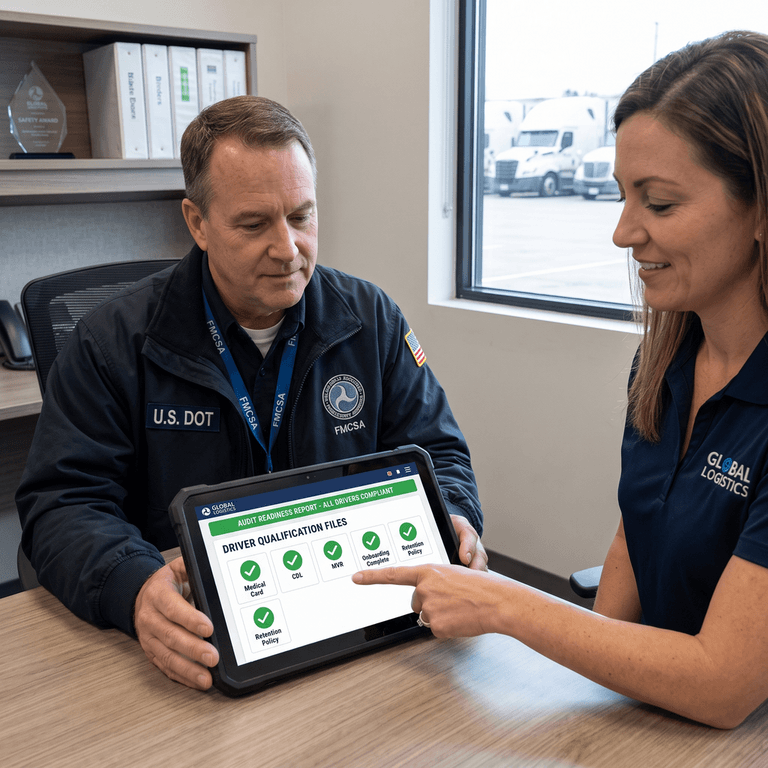
| Audit readiness | Days of document hunting before an audit | Always ready; export a sample in minutes |
| Compliance alerts | Sticky notes and calendar alarms | Escalating automated email and SMS notifications |
| Document retrieval | Slow; requires physical filing-cabinet access | Instant; search by driver, document, or status |
| Reporting | Manual, inconsistent, hard to verify | On-demand, standardized, audit-formatted |
| Scalability | Breaks down past ~20 vehicles | Scales from 5 to 500+ without adding headcount |
| Operational efficiency | Reactive; driven by deadlines and panic | Proactive; driven by early, automated action |

Best Practices for Passing a DQF Audit
To make FMCSA audit preparation a routine, low-stress event, build these practices into your daily operation:
-
1. Standardize onboarding
Never dispatch a new hire until their digital DQF is 100% complete. Enforce a strict driver qualification file checklist directly in your software so a missing document blocks dispatch automatically.
-
2. Store documents electronically
Move entirely to secure cloud storage. Paper is a liability, and electronic driver files are explicitly permitted by FMCSA when they are accurate and reproducible.
-
3. Run recurring internal compliance audits
Do not wait for the DOT. Review a random 10% sample of active files every quarter to catch slippage before an investigator does.
-
4. Automate every reminder
Set escalating alerts for medical cards, CDLs, and annual MVRs. Remove human memory from the safety equation entirely.
-
5. Maintain a centralized audit folder
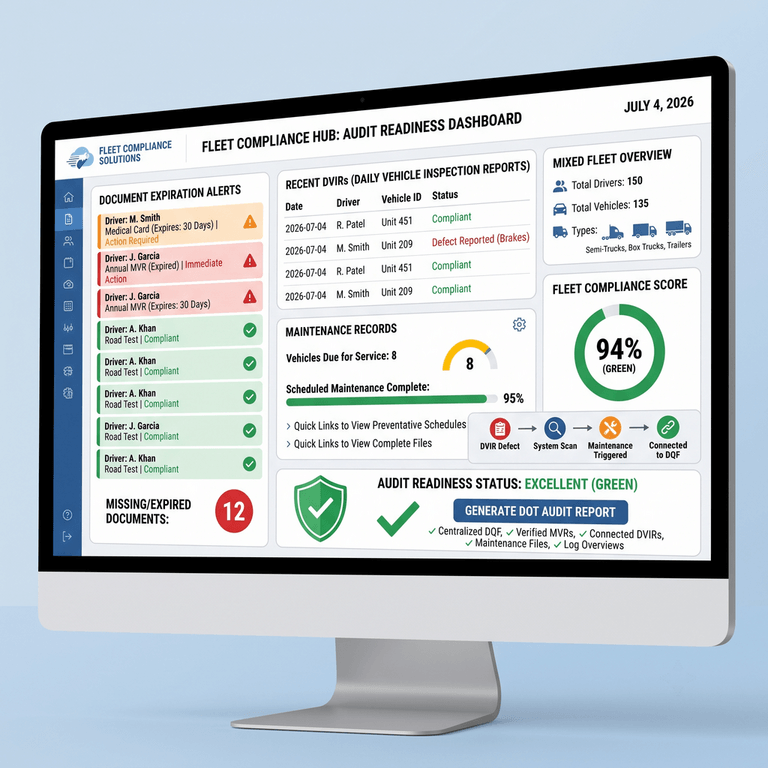
Keep DQFs, inspection records, and maintenance documentation in interconnected, searchable storage so a full audit package is one click away.
-
6. Enforce document retention policies
Automatically archive historical records for the required period — for example, retaining an MVR for three years even after a driver leaves the company.
-
7. Practice an audit drill
Pick five drivers and produce complete, current files in minutes. If it takes hours, your process still needs work.
Compliance Software Comparison
Choosing the right trucking compliance software matters, because no single tool does everything equally well. Here is how the 2026 landscape breaks down for driver qualification and fleet compliance. Pricing is described only where publicly known and varies by fleet size and configuration — always confirm current quotes directly.
- Motive & Samsara — These telematics leaders excel at GPS tracking, ELD/HOS logging, and safety cameras. They include document storage features, but their core strength is hardware-driven telematics rather than deep DQF and driver HR workflows. Best fit: fleets that want an all-in-one telematics platform and can support proprietary hardware.
- Whip Around — Strong for digital DVIR, inspections, and maintenance workflows. Many fleets pair it with dedicated HR tooling for background screening and DQF building. Best fit: fleets prioritizing inspection and maintenance compliance.
- Foley & Tenstreet — Specialists in driver onboarding, background screening, and continuous MVR monitoring. They are excellent for building and monitoring the qualification file itself, but they operate separately from your daily vehicle inspection and maintenance systems. Best fit: high-volume hiring operations focused on screening.
- J.J. Keller — A legacy provider with deep regulatory expertise and managed services. Its Encompass platform offers robust DQF tracking; some teams find the interface less modern than newer cloud-native tools. Best fit: fleets that value managed compliance services and reference-grade regulatory content.
- PTI4YOU — A cloud-native, hardware-agnostic inspection and compliance ecosystem. It centralizes DVIRs, maintenance records, and compliance workflows so the operational side of your audit is airtight and connected to your driver documentation strategy. Best fit: small and mid-sized fleets (5–500 vehicles) that want audit readiness without proprietary hardware or long contracts.
The practical takeaway: screening specialists build the file, telematics suites track the truck, and PTI4YOU keeps the daily operational compliance — inspections, maintenance, and documentation — organized and ready for the investigator who wants to see more than just the DQF.
Why PTI4YOU Helps Simplify DQF Compliance
True DOT audit readiness is not just storing a medical card. It is a holistic view of your safety management — and that is where PTI4YOU strengthens your operational workflow. As a dedicated digital inspection and compliance ecosystem, PTI4YOU is built for fleets that want to leave paper behind for good.
You might use a screening specialist to run a driver's background check, but you still need a daily operational tool to ensure that driver is performing compliant pre-trip inspections and logging defects correctly. PTI4YOU serves as your fleet document management solution for daily operations, centralizing inspection records, maintenance documentation, and compliance visibility into one cloud hub. When a DOT auditor arrives, they rarely stop at the DQF — they also want your vehicle maintenance files and DVIRs. PTI4YOU makes sure that operational side of the audit is flawless.
The platform reinforces the same principles that protect your driver files: centralized documentation, automated digital workflows, searchable cloud storage, and continuous compliance visibility. Combined with strong driver qualification practices, it closes the gaps that turn a routine inspection into a violation.
Stop Chasing Paperwork Before Every DOT Audit
PTI4YOU helps organize inspection records, maintenance documentation, and compliance workflows so your fleet is always audit-ready. No hardware lock-in, no long-term contracts.
Start Your Free Trial TodaySoft CTA: request a workflow review. Hard CTA: launch your digital compliance rollout this quarter.
Fleet Compliance Checklist
Use this actionable checklist to protect your fleet from preventable penalties:
- Verify every driver has a complete DQF. No driver is dispatched without a fully vetted file.
- Monitor CDL expiration dates. Set automated alerts at least 90 days before expiration.
- Track medical certificates. Ensure drivers see an FMCSA-registered examiner before the current card expires.
- Review annual MVRs. Schedule automated pulls of state driving records every 12 months.
- Maintain electronic document storage. Digitize all legacy paper files into a secure, searchable database.
- Perform quarterly compliance reviews. Audit a 10% sample of active files each quarter.
- Archive historical records properly. Retain documents for the FMCSA-mandated periods, including post-employment.
- Prepare audit-ready reports. Confirm your software can export complete files instantly for DOT investigators.
- Standardize onboarding documentation. Use a rigid, repeatable digital workflow for every new hire.
- Automate reminders wherever possible. Remove human memory from your safety management equation.
Official References & Internal Resources
Validate the regulatory framework behind this article with these authoritative sources:
- 49 CFR Part 391 — Qualification of Drivers (eCFR)
- 49 CFR 391.51 — General requirements for driver qualification files (eCFR)
- 49 CFR 391.25 — Annual inquiry and review of driving record (FMCSA)
- FMCSA National Registry of Certified Medical Examiners
Continue strengthening your compliance program with these PTI4YOU guides:
- Preparing for a DOT Safety Audit: Compliance Review & Violations
- How to Survive a DOT Safety Audit: 2026 Failure Patterns
- 11 New FMCSA Rules for 2026: Fleet Guide
- Pre-Trip Inspection & DVIR Software Guide
- Paper Logs vs. Electronic DVIR Apps: Hidden Cost Calculator
- Canadian NSC Standard 13 Compliance Guide
Frequently Asked Questions (FAQ)
What is included in a Driver Qualification File?
A DQF must include the driver's employment application, the safety performance history inquiry to previous employers, the initial MVR from each state of licensure, the annual MVR review and certificate of violations, a road test certificate or CDL equivalency, and a valid medical examiner's certificate, as required under 49 CFR Part 391.
How often should DQFs be reviewed?
FMCSA requires an MVR review for each driver at least once every 12 months. In 2026, best practice is continuous driver monitoring so that expired medical cards, suspended CDLs, or new violations are flagged immediately rather than up to a year later.
What happens during a DOT DQF audit?
An investigator requests a sample of driver files and confirms every required document is present, legible, and current. Missing documents, expired medical certificates, or absent annual reviews lead to violations and monetary penalties.
Can DQFs be stored electronically?
Yes. FMCSA permits electronic driver files when records are accurate, accessible, and reproducible. Digital storage is recommended for security, rapid audit retrieval, and automated compliance alerts.
What are the penalties for missing DQF documents?
Driver qualification recordkeeping violations carry significant civil penalties, and using an unqualified driver is treated more seriously than a minor lapse. Beyond fines, you risk out-of-service orders, higher insurance costs, and litigation exposure.
How can software automate DQF compliance?
Driver file compliance software stores documents centrally, reads expiration dates, schedules annual MVR reviews, and sends escalating notifications to managers and drivers before critical records expire.
What documents expire most frequently?
The medical examiner's certificate expires most often (typically every 1–2 years), followed by the annual MVR review (every 12 months), and then the CDL at its state renewal interval.
Stay Audit-Ready Year-Round — Not Just Audit Week
Driver qualification compliance is no longer a quarterly chore that can wait until an investigator schedules a visit. In 2026, the fleets that win are the ones that treat DQF audit readiness as a continuous, automated state — where every medical card, CDL, and annual MVR is tracked, every renewal is prompted early, and every record is one search away.
If your current process still relies on spreadsheets, sticky notes, and last-minute scrambles, you are carrying unnecessary financial, operational, and legal risk. Pair strong driver qualification monitoring with a connected operational compliance platform, and an audit becomes a routine verification instead of an emergency.
Make Audit Anxiety a Thing of the Past
Stop chasing paperwork before every DOT audit. PTI4YOU helps organize inspection records, maintenance documentation, and compliance workflows so your fleet is always audit-ready.
Start your free trial or book a demo today. No hardware lock-in. Faster setup. Cleaner records.
Start Your Free Trial or Book a DemoBuilt for small and mid-sized fleets across the USA and Canada.