
The Bottom Line Up Front: Most FMCSA safety audits and compliance investigations in 2026 are conducted off-site through secure federal systems like the New Entrant Web System (NEWS) or the Safety Measurement System (SMS) Carrier Dashboard. Fleets are expected to upload structured, legible, correctly timestamped digital records — not scanned paper stacks — and the speed and organization of that upload directly influences whether the investigation stays off-site or escalates.
Key Takeaways: Surviving the FMCSA Digital Portal in 2026
- Off-site is the default: New entrant safety audits are assessed for off-site eligibility automatically, and most established carriers under investigation also submit records remotely through a federal portal rather than hosting an investigator on-site.
- Retention windows are strict and document-specific: DVIRs must be kept 3 months (49 CFR 396.11), Driver Qualification Files for employment plus 3 years (49 CFR 391.51), maintenance records for 1 year plus 6 months after disposal (49 CFR 396.3), and Hours-of-Service supporting documents for 6 months (49 CFR 395.8).
- Paper creates its own violations: Illegible scans, missing timestamps, and inconsistent filenames do not just slow you down — they can independently trigger follow-up requests, extended timelines, and escalation to an on-site review.
- Centralization wins audits: Fleets that store DVIRs, DQFs, maintenance history, and inspection data in one searchable cloud system can generate a complete, organized upload package in minutes instead of days.
The Shift from Filing Cabinets to Digital Portals
For decades, a Federal Motor Carrier Safety Administration audit meant one thing: a safety investigator showing up at your terminal, sitting down at a folding table in the breakroom, and spending one to three days flipping through binders of driver files and maintenance logs. That version of the audit still exists, but it is no longer the default. By 2026, the overwhelming majority of new entrant safety audits — and a growing share of ongoing compliance investigations for established carriers — are conducted entirely off-site, through a secure digital exchange between the carrier and the FMCSA.
This is not a minor procedural tweak. It is a structural change in how audit readiness is defined. When an investigator is physically standing in your office, a slightly disorganized filing cabinet can still be worked around; you can walk to the shop, pull a folder, and hand it over while they wait. When the same investigator is reviewing your fleet from a desk hundreds of miles away, that improvisation disappears. You are given a written document request, a login to a federal system, and a deadline. What you upload — and how quickly and cleanly you upload it — becomes the entire audit experience.
This is exactly where paper-based operations collapse. A carrier that has spent years managing Driver Qualification Files, DVIRs, and maintenance logs on paper does not simply lack a filing cabinet during an off-site audit — they lack a system for producing a clean, complete, machine-readable record set on demand. Scanning three months of grease-stained DVIRs into a single unsorted PDF the night before a deadline is not digital compliance; it is paper compliance wearing a digital costume, and FMCSA investigators recognize the difference immediately.
This guide breaks down exactly how the FMCSA off-site audit process works in 2026, which documents investigators expect to see, why scanned paper consistently underperforms structured digital records, and how fleet owners, safety managers, and compliance consultants across the United States and Canada can build a compliance program that is audit-ready every day of the year — not just the week a document request letter arrives.
What Is an FMCSA Off-Site Audit?
An FMCSA off-site audit is a safety investigation conducted remotely: instead of an investigator visiting your terminal, you upload requested records — driver files, DVIRs, maintenance logs, and Hours-of-Service data — through a secure federal system, and the auditor reviews everything from their own workstation.

There are two audit tracks fleets need to understand, and they use different systems.
New Entrant Safety Audits
Every new motor carrier is monitored for its first 18 months under the FMCSA's New Entrant Safety Assurance Program and must pass a mandatory Safety Audit, generally within the first year of operation. According to the FMCSA's official New Entrant Program guidance, the agency's system automatically assesses each new carrier for off-site eligibility once the call center has validated the carrier, or 90 days after receiving a USDOT number, whichever comes first. Carriers are required to complete an on-site audit instead if they meet specific risk triggers, including operating passenger or household goods authority, hauling placarded hazardous materials, having a recordable crash, exceeding a Behavior Analysis and Safety Improvement Category (BASIC) threshold in the Safety Measurement System, or having previously been placed out-of-service for failing to submit documentation during a prior off-site audit. Every other new entrant is considered off-site eligible and submits records through the New Entrant Web System (NEWS), the same login credentials used for the broader FMCSA Portal.
Compliance Reviews and Off-Site Investigations
Established carriers face a different mechanism: the Compliance Review, defined under 49 CFR Part 385 as an on-site or off-site examination of a carrier's safety management controls, typically triggered by roadside inspection trends, crash history, complaints, or a poor Safety Measurement System profile. In these cases, a Safety Investigator (SI) opens the investigation with an initial contact call, follows up with a written Initial Contact Letter and Document Request Letter, and the carrier uploads records — typically through the SMS Carrier Dashboard or FMCSA Portal — on the schedule the investigator specifies. Follow-up document requests, phone calls, and a closeout meeting (often conducted over video call) complete the process before a final determination is issued.
In both tracks, the practical reality is the same: the deadline, document list, and submission method are dictated by the auditor's official letter, and your job is to be able to produce a complete, organized, legible package the moment that letter arrives — not three weeks later.
Why Paper Scans Are No Longer Enough
Paper scans fail modern off-site audits because they cannot reliably preserve accurate timestamps, remain legible after repeated handling, or be organized consistently enough for an investigator to cross-reference against ELD data, maintenance schedules, and prior submissions within a tight review window.
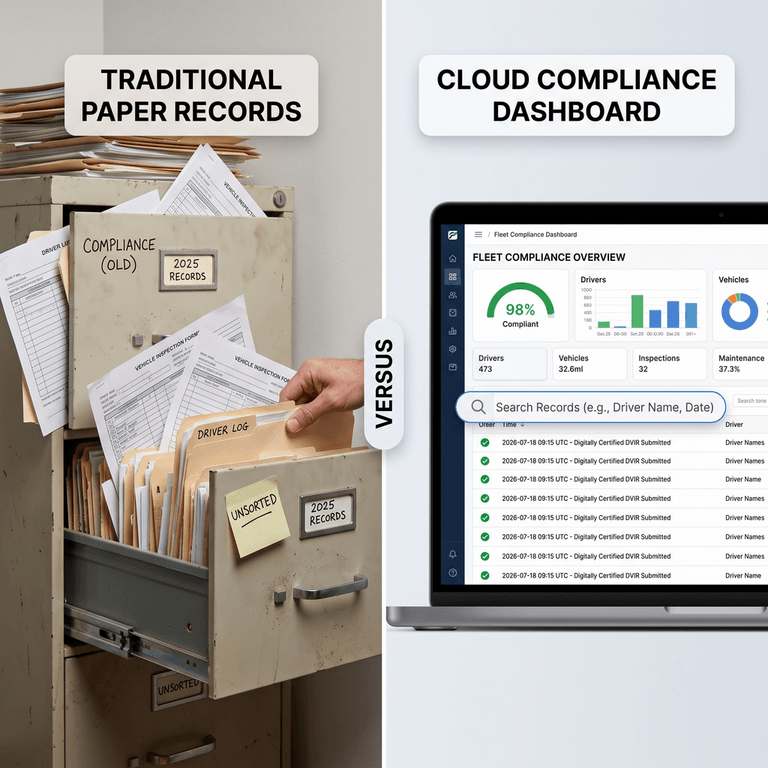
Fleets that still rely on paper DVIRs, scanned maintenance invoices, manually organized folders, email attachments, and disconnected spreadsheets tend to experience the same five failure points once an off-site audit begins:
- Missing or unreliable timestamps. A handwritten date on a DVIR can be altered, illegible, or simply absent. Because investigators routinely cross-reference DVIR dates against ELD logs and dispatch records, a fuzzy or missing timestamp reads as a red flag rather than an oversight.
- Unreadable scans. Thermal paper fades, coffee stains bleed through carbon-copy forms, and a smartphone photo taken at an angle in a dim cab produces a file an auditor cannot actually read. An illegible record is functionally the same as a missing one.
- Inconsistent filenames and folder structures. When files are named "scan001.pdf," "IMG_4821.jpg," and "Truck 12 (2).pdf," nobody — including the safety manager who created them — can reliably locate a specific document under deadline pressure.
- Version control problems. Which copy of a driver's file is current? Which spreadsheet has the latest medical certificate expiration date? When records live in email threads and shared drives instead of one system of record, conflicting versions are inevitable.
- Incomplete document histories. Paper gets lost in a cab, thrown out during a cleanup, or simply never filed. A 90-day DVIR retention requirement is only meaningful if all 90 days actually exist and can be produced together.
None of these problems are hypothetical edge cases — they are the routine, everyday failure modes of manual, paper-first recordkeeping. And in an off-site review, where the investigator's entire impression of your safety program is formed by the documents you upload, these gaps translate directly into follow-up requests, extended review timelines, and a materially higher risk of an unfavorable determination.
Documents Auditors Expect Immediately
Regardless of whether your investigation is a New Entrant Safety Audit or a full Compliance Review, the categories of records requested are drawn from the same core set of Federal Motor Carrier Safety Regulations. The table below summarizes the documents most consistently requested, their federally mandated minimum retention period, the mistake fleets make most often, and the digital best practice that avoids it.
| Document | Retention Requirement | Common Mistake | Digital Best Practice |
|---|---|---|---|
| Driver Qualification Files (DQF) | Duration of employment plus 3 years (49 CFR 391.51) | Expired medical certificates or missing annual MVR reviews go unnoticed until the audit itself | Centralized digital file per driver with automated expiration alerts for CDL, medical card, and annual MVR |
| DVIR Records | 3 months / 90 days (49 CFR 396.11) | Gaps in the daily chain of paper forms, missing mechanic or driver signatures | Electronic DVIR with mandatory driver and mechanic sign-off captured at the point of inspection |
| Vehicle Maintenance Records | 1 year while controlled, plus 6 months after disposal (49 CFR 396.3) | Repair history scattered across shop invoices, texts, and sticky notes | Digital maintenance log linked to each unit's VIN with searchable repair history |
| Annual Periodic Inspection Reports | Until the next inspection is due, or 14 months, whichever is longer (49 CFR 396.21) | Original inspection certificate lost; no copy retained at the terminal | Scanned certificate uploaded to the vehicle's digital file the same day it is issued |
| Repair History / Work Orders | Aligned with maintenance record retention (49 CFR 396.3) | Defects noted on a DVIR with no corresponding proof of repair | Closed-loop digital workflow linking each reported defect to a signed repair record |
| Vehicle Registration | Current registration must be maintained for each active unit | Registration renewed but the new copy never reaches the compliance file | Digital vehicle profile with registration renewal reminders and instant document retrieval |
| Proof of Insurance | Current coverage on file per 49 CFR Part 387 | Outdated certificate on file after a mid-term policy change | Insurance documents stored alongside vehicle and carrier records in one system |
| ELD Supporting Documents | 6 months (49 CFR 395.11) | Supporting documents (bills of lading, fuel receipts) never matched to the driver's log | Digital capture and tagging of supporting documents against the corresponding duty status record |
| Hours-of-Service (HOS) Records | 6 months (49 CFR 395.8) | Paper logs (for exempt drivers) illegible or incomplete for the requested period | Digital time and duty-status records exportable by date range in seconds |
| Drug & Alcohol Documentation | 1 to 5 years depending on record type (49 CFR 382.401) | Missing proof of annual FMCSA Clearinghouse queries or driver consent forms | Digital consent and query log stored per driver with annual query reminders |
Two categories deserve extra attention because they are consistently among the most cited violations in FMCSA investigations. Driver Qualification File gaps — expired medical certificates, missing annual reviews, incomplete employment applications — demonstrate a systemic breakdown in safety management controls, which is precisely what a Compliance Review is designed to detect. Learn how to close these gaps in our guide to continuous Driver Qualification File monitoring. Likewise, DVIR retention failures under 49 CFR 396.11 remain one of the most common reasons carriers receive follow-up document requests during an off-site review; our breakdown of the three-signature DVIR cycle explains exactly what a compliant record must contain.
The New Digital Audit Workflow
The fundamental difference between a paper-based fleet and a digitally mature one is not whether a PDF eventually exists — it is when the record becomes structured, searchable data. A digitally mature fleet treats compliance as a continuous lifecycle rather than a once-a-year scanning project:
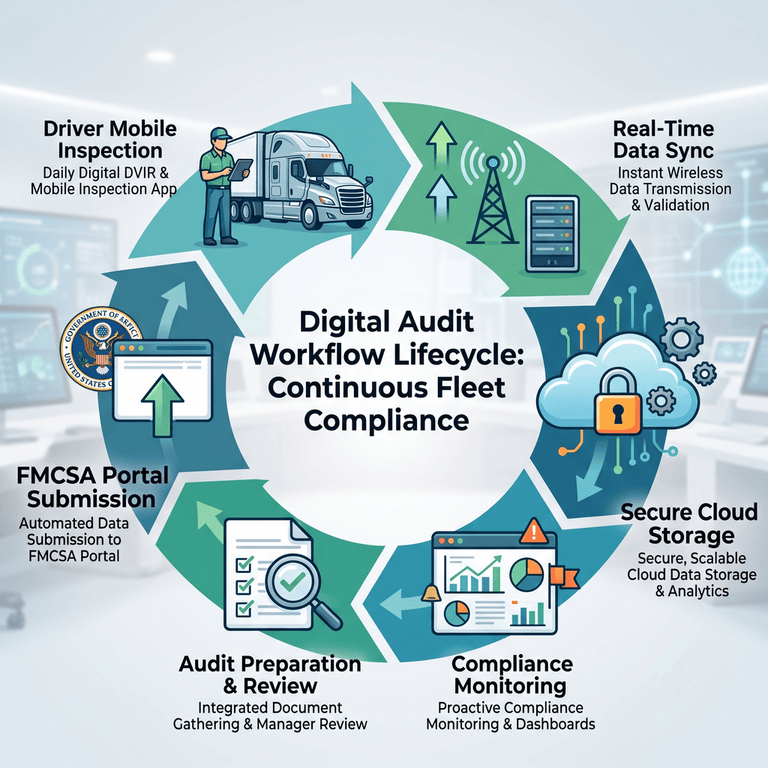
- Driver completes inspection. A pre-trip or post-trip inspection is performed on a smartphone or tablet, with defects documented through structured fields and photos rather than handwritten notes.
- Digital record created. The completed inspection is instantly timestamped, geotagged, and attached to the specific vehicle's permanent record — no re-keying, no re-scanning.
- Cloud storage. The record is stored securely in a centralized repository, backed up automatically, and made searchable by vehicle, driver, date, and defect type.
- Maintenance linkage. If a defect is reported, the system automatically opens a work order, closing the loop when a mechanic certifies the repair — satisfying the three-signature requirement under 49 CFR 396.11.
- Compliance dashboard. Fleet managers see a real-time view of DVIR completion rates, open defects, expiring DQF documents, and upcoming inspection deadlines in one dashboard.
- Instant retrieval during audit. When a document request letter arrives, the required date range and document type are filtered and exported in minutes, ready for upload to NEWS, the FMCSA Portal, or the SMS Carrier Dashboard.
Compare that lifecycle with the reactive alternative: a driver fills out a paper form, the form sits in the truck door pocket for a week, someone eventually collects it, a scanning session happens once a month (if at all), and the file is dropped into a shared folder with no consistent naming convention. By the time an audit notice arrives, reconstructing 90 days of DVIRs, matching them to repair invoices, and organizing everything into an upload-ready package becomes a multi-day scramble — precisely the kind of administrative overhead that modern fleet management platforms are designed to eliminate.
Common Reasons Fleets Fail Remote Audits
Investigators do not need to find a single catastrophic violation to trigger an unsatisfactory determination or an escalation to an on-site review. In practice, off-site audits are far more often lost through an accumulation of avoidable administrative failures:
- Missing files. A driver's medical certificate, a specific DVIR date, or an annual inspection certificate simply cannot be located when requested.
- Incorrect document versions. An outdated insurance certificate or an old copy of a driver's qualification file is uploaded instead of the current one.
- Slow response times. The carrier misses the auditor's specified deadline because records must be manually gathered from multiple physical locations.
- Paper records never digitized. Historical DVIRs or maintenance logs exist only on paper at a terminal, making them impossible to upload quickly — or at all — to a digital portal.
- Missing maintenance history. A vehicle's repair record cannot be connected to the defect a driver originally reported, breaking the required closed-loop repair chain.
- Lost inspection reports. Annual periodic inspection certificates are misplaced, leaving no proof the vehicle was legally cleared to operate.
- Disconnected systems. ELD data lives in one vendor's platform, DVIRs in another app, and maintenance records in a spreadsheet — with no single place to reconcile them against each other before submission.
Each of these failure points increases regulatory risk independently of any underlying safety problem on the road. An incomplete or slow response can extend the investigation, prompt additional document requests, or — per FMCSA's own published criteria for New Entrant audits — convert a carrier's future eligibility from off-site to a mandatory on-site review. In the most severe cases, a documented history of failing to respond to an off-site audit request is itself listed as a trigger that can lead to an Out-of-Service order. Administrative disorganization, in other words, is not a separate problem from safety compliance in the eyes of an auditor — it is treated as direct evidence of it.
Manual Filing vs. Digital Compliance Platform
The operational gap between paper-based recordkeeping and a purpose-built compliance platform becomes most visible when measured across the specific capabilities an off-site audit demands:
| Capability | Manual / Paper Filing | Digital Compliance Platform |
|---|---|---|
| Document Retrieval Speed | Hours to days, dependent on physical location and staff availability | Seconds to minutes via search and filter |
| Audit Readiness | Reactive; requires a dedicated prep effort before every audit | Continuous; records are audit-ready the moment they are created |
| Searchability | Manual sorting through folders, binders, or unindexed scans | Instant search by vehicle, driver, date range, or defect type |
| Version Control | Multiple copies across email, drives, and paper with no single source of truth | One authoritative record per driver, vehicle, and document type |
| Security | Vulnerable to loss, fire, water damage, and unauthorized physical access | Encrypted cloud storage with automated backups |
| Retention Management | Manually tracked; easy to miss expiration or destruction dates | Automated retention timers aligned to each FMCSR requirement |
| User Permissions | All-or-nothing access to a physical filing cabinet | Role-based access for drivers, mechanics, and safety managers |
| Scalability | Administrative burden grows linearly — or worse — with fleet size | Scales from 5 to 500+ vehicles without added filing overhead |
| Remote Access | Records tied to a single physical office or terminal | Accessible from any device, anywhere, at any time |
| Operational Efficiency | Significant admin hours spent filing, scanning, and searching | Administrative time redirected toward safety management, not paperwork |
Software Comparison: Motive, Samsara, Whip Around, JJ Keller & Fleetio
Fleets evaluating compliance software for off-site audit readiness generally encounter five recurring names. Each was built around a different core problem, and that origin still shapes how well each platform supports document-heavy audit preparation today.
| Platform | Primary Focus | Document / Records Management | Hardware Required | Pricing Transparency |
|---|---|---|---|---|
| Motive | ELD & AI dashcams, broad fleet operations | Integrated eDVIR tied to HOS logs; solid but secondary to telematics | Yes — proprietary ELD hardware | Opaque; custom enterprise quoting |
| Samsara | Enterprise IoT & telematics | Robust, highly customizable eDVIR and compliance dashboards | Yes — proprietary gateways | Opaque; custom enterprise quoting |
| Whip Around | Digital inspections & defect workflows | Purpose-built inspection and maintenance record management | No — BYOD (Bring Your Own Device) | Public, per-asset pricing |
| JJ Keller | Regulatory compliance, consulting, training & ELD | Broad compliance document library plus DVIR/ELD modules | Varies by product line | Varies; largely quote-based for enterprise suites |
| Fleetio | Asset lifecycle & maintenance CMMS | Deep maintenance history and parts/vendor tracking; strong system-of-record for repairs | No — cloud SaaS | Public, tiered SaaS pricing |
| PTI4YOU | Focused DOT compliance & DVIR automation | Unified digital DVIR, DQF, and maintenance records built for audit retrieval | No — hardware-agnostic, BYOD | Fully transparent SaaS pricing |
Motive (formerly KeepTruckin) built its reputation as an industry-leading Electronic Logging Device with a highly intuitive driver app. Its electronic DVIR module is functional and tied directly to the driver's duty status, which works well for fleets whose primary concern is HOS compliance. Its limitation for off-site audit preparation is that document management is a secondary feature layered onto an ELD-first product, and adoption typically requires multi-year proprietary hardware contracts. Motive is best suited to fleets that want one vendor for hardware, ELD, and basic inspections and are comfortable with an enterprise-style commitment.
Samsara is the enterprise IoT leader, offering highly customizable eDVIR workflows integrated into a broader telematics and safety platform. Its document management and compliance dashboards are genuinely strong, but the platform is priced and architected for large, complex fleets, and requires proprietary hardware gateways. For a fleet primarily concerned with surviving an off-site FMCSA audit rather than building an enterprise IoT ecosystem, Samsara often represents significant unused functionality relative to its cost.
Whip Around was built specifically to digitize the vehicle inspection process, with customizable forms, photo capture, and automatic work order generation when a driver reports a defect. It does not include a native ELD, so fleets that need Hours-of-Service compliance must integrate or run a separate system for that requirement, which can complicate a single, unified audit export.
JJ Keller is one of the most established names in trucking compliance, known for its regulatory publications, training programs, and consulting services alongside ELD and inspection software. Its strength is breadth — a single vendor relationship covering training, forms, and software — which appeals to fleets that want a compliance partner rather than a single-purpose app. Its enterprise suite pricing is typically quote-based rather than published, so cost comparisons require a direct consultation.
Fleetio positions itself as a system of record for asset lifecycle and maintenance management, with deep parts inventory tracking, vendor coordination, and total cost of ownership analytics. It is an excellent fit for operations with in-house repair shops that need granular maintenance history, but it is not primarily built around DVIR compliance or DQF tracking, so fleets whose main exposure is DOT audit documentation may need to pair it with a dedicated inspection tool.
Each of these platforms solves a real problem well. The distinction fleet decision-makers should focus on is fit: do you need an all-in-one telematics ecosystem, a dedicated maintenance CMMS, a broad compliance consultancy, or a focused, hardware-agnostic system built specifically to keep DVIRs, DQFs, and maintenance records audit-ready without a multi-year hardware contract.
Why PTI4YOU Simplifies Off-Site Audits
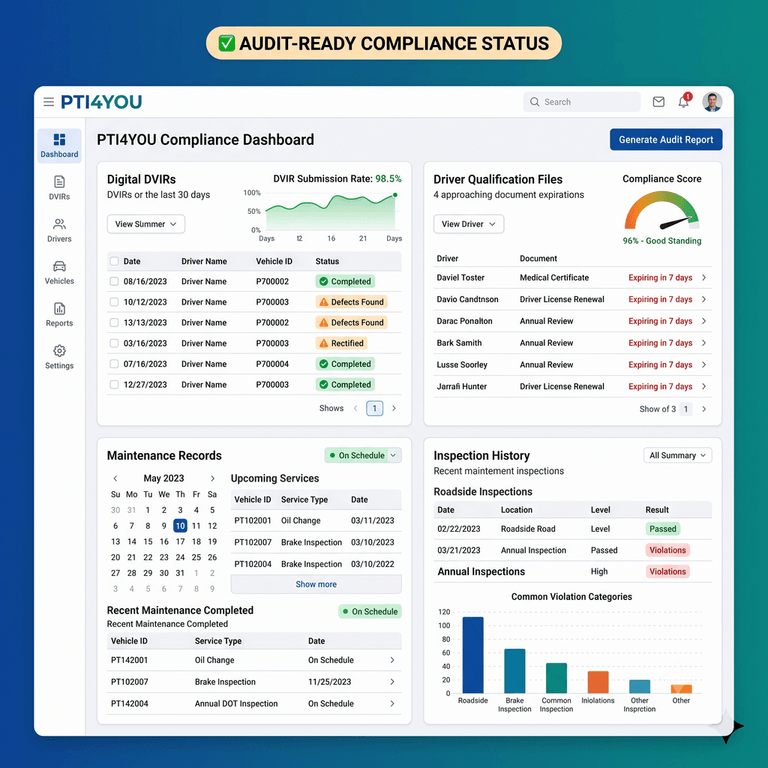
PTI4YOU was built around a single premise: a fleet of 5 to 500 vehicles should never have to choose between an oversized enterprise telematics contract and a filing cabinet full of grease-stained paper. As a hardware-agnostic platform, PTI4YOU runs on the smartphones and tablets your drivers and mechanics already carry — no proprietary gateways, no multi-year hardware lock-in.
For fleets preparing for an FMCSA off-site audit, that translates into concrete capabilities:
- Digital DVIR: Structured pre- and post-trip inspections with timestamped, GPS-tagged submissions and mandatory driver-mechanic sign-off, satisfying the three-signature requirement under 49 CFR 396.11.
- Cloud document storage: Every inspection, repair record, and compliance document lives in one encrypted, automatically backed-up repository.
- Maintenance history: Defects reported on a DVIR are automatically linked to the resulting repair, closing the loop auditors specifically look for.
- Centralized compliance records: Driver Qualification Files, DVIRs, and maintenance data live side by side instead of across three disconnected systems.
- Fast document retrieval: Filter by vehicle, driver, or date range and export an upload-ready package in minutes.
- Audit-ready workflows: Retention timers aligned to the FMCSR schedules covered earlier in this guide, so nothing is deleted early or kept past its useful purpose.
- Compliance dashboards: A real-time view of open defects, expiring documents, and inspection completion rates across the entire fleet.
Stop Scrambling Before Every FMCSA Audit
Stop searching through paper folders before every FMCSA audit. pti4you.com centralizes inspections, maintenance records, and compliance documentation so your fleet is always ready to respond.
Start your 15-day free trial today. No credit card required.
Start Your 15-Day Free Trial – No Credit Card RequiredZero setup fees. Zero hardware. 25-minute driver onboarding.
Off-Site Audit Readiness Checklist
Use this 10-point checklist to evaluate your fleet's readiness before a document request letter ever arrives:
- Verify digital Driver Qualification Files. Confirm every active driver has a complete, current DQF with valid medical certification and annual MVR review on file.
- Store all DVIRs electronically. Eliminate paper inspection forms and capture every pre- and post-trip inspection digitally, with driver and mechanic sign-off.
- Maintain searchable maintenance records. Ensure repair history for every unit can be filtered by vehicle, date, and defect type.
- Track document retention automatically. Align retention timers to each FMCSR requirement so records are neither deleted early nor cluttering the system past their useful life.
- Review expiring compliance documents. Set alerts for medical certificates, registrations, and insurance policies before they lapse.
- Verify cloud backups. Confirm your compliance data is encrypted and backed up independently of any single device or office location.
- Assign user permissions. Give drivers, mechanics, and safety managers role-appropriate access so the right person can retrieve the right record instantly.
- Test document retrieval. Run a mock request — pull 90 days of DVIRs for a random vehicle — and time how long it takes.
- Conduct quarterly internal audits. Self-audit a sample of driver files and vehicle records every quarter using the same checklist an FMCSA investigator would use.
- Maintain one centralized compliance repository. Consolidate DVIRs, DQFs, maintenance records, and inspection history into a single system instead of scattering them across email, spreadsheets, and paper.
Frequently Asked Questions
What is an FMCSA off-site audit?
An FMCSA off-site audit is a safety investigation conducted remotely, where a motor carrier uploads requested records — such as driver qualification files, DVIRs, and maintenance logs — through a secure federal system instead of hosting an investigator on-site. New entrants are typically evaluated through the New Entrant Web System (NEWS), while established carriers under investigation often submit documents through the FMCSA Portal or the Safety Measurement System (SMS) Carrier Dashboard.
What documents are required for an FMCSA off-site audit?
Auditors commonly request Driver Qualification Files, DVIRs, vehicle maintenance and repair records, annual inspection reports, Hours-of-Service and ELD supporting documents, the accident register, proof of insurance, vehicle registration, and Drug and Alcohol Clearinghouse query records. The exact list depends on the reason for the investigation and is specified in the auditor's official document request letter.
How long should compliance records be retained?
Retention periods vary by document under the Federal Motor Carrier Safety Regulations. DVIRs must be kept for 3 months (49 CFR 396.11), Driver Qualification Files for the duration of employment plus 3 years (49 CFR 391.51), general maintenance records for 1 year while the vehicle is controlled plus 6 months after disposal (49 CFR 396.3), and Hours-of-Service supporting documents for 6 months (49 CFR 395.8).
Can scanned paper documents satisfy an audit?
Scanned paper documents can technically be uploaded, but they frequently fail practical review because they lack embedded timestamps, are illegible, are misfiled, or cannot be cross-referenced quickly against ELD and maintenance data. This typically triggers follow-up document requests, extends the investigation timeline, and increases the risk of a rating downgrade or an escalation to an on-site audit.
What is the fastest way to prepare for an FMCSA audit?
The fastest way to prepare is to centralize Driver Qualification Files, DVIRs, and maintenance records in a single searchable digital system before an audit notice ever arrives, so any document can be filtered, exported, and uploaded within minutes rather than days. Running a quarterly internal self-audit against the FMCSA's document checklist closes gaps before an investigator finds them.
How do digital compliance systems improve audit readiness?
Digital compliance systems improve audit readiness by automatically timestamping records, applying consistent file naming, tracking document retention windows, storing everything in one searchable cloud repository, and generating clean exports on demand. This eliminates the version-control and legibility problems that cause paper-based fleets to fail off-site reviews.
How can fleets reduce audit response time?
Fleets reduce audit response time by digitizing inspections and maintenance at the point of creation instead of scanning paper afterward, assigning clear user permissions so the right staff can retrieve records instantly, and testing document retrieval before an audit notice arrives rather than during one.
Conclusion: Treat Every Day Like Audit Day
The FMCSA's move to off-site, portal-based investigations is not a temporary pandemic-era accommodation — it is now the standard operating model for new entrant safety audits and a growing share of compliance reviews for established carriers. That shift rewards fleets that treat compliance as a continuous, digital discipline and penalizes fleets that treat it as an annual scramble through a filing cabinet.
Paper scans were never truly compliant with the spirit of the Federal Motor Carrier Safety Regulations — they were simply a tolerated workaround in an era when audits happened in person and an investigator could wait while you searched for a folder. That tolerance disappears the moment the review moves to a digital portal with a fixed deadline. Fleets that digitize inspections and maintenance at the point of creation, rather than scanning paper after the fact, walk into every off-site audit with a decisive structural advantage.
Building that advantage does not require an enterprise telematics contract or a multi-year hardware commitment. It requires a centralized, searchable, hardware-agnostic system that keeps your digital inspections, driver qualification files, and fleet compliance software working together instead of scattered across paper, email, and spreadsheets.
Build an Audit-Ready Fleet Before the Portal Login Arrives
Stop searching through paper folders before every FMCSA audit. pti4you.com centralizes inspections, maintenance records, and compliance documentation so your fleet is always ready to respond.
Start your 15-day free trial today. No credit card required.
Start Your 15-Day Free Trial – No Credit Card RequiredZero setup fees. Zero hardware. 25-minute driver onboarding.